
Got Questions? We've Got Answers!
Ope! Rewards - How-To & FAQ
STEP 1
SIGN UP AS AN ARRYVED INSIDER
Ope uses the Arryved POS (point-of-sale) system which has a built in member tracking platform. We utilize this platform to track individual customer spend. In essence, Arryved Insider = Ope! Rewards.
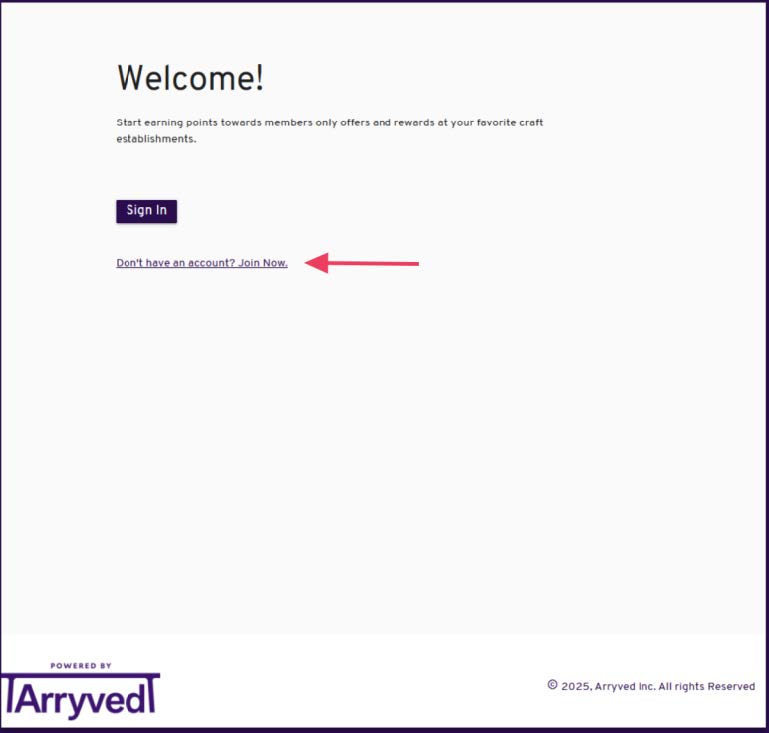
The first step to becoming an Ope! Rewards member is to sign-up with the Arryved Insider program. This can be done at any time so please consider doing so prior to starting or closing a tab. Visit https://insider.arryved.com/html/pages/signup/signup.html and click "Don't have an account? Join now." to begin the process.
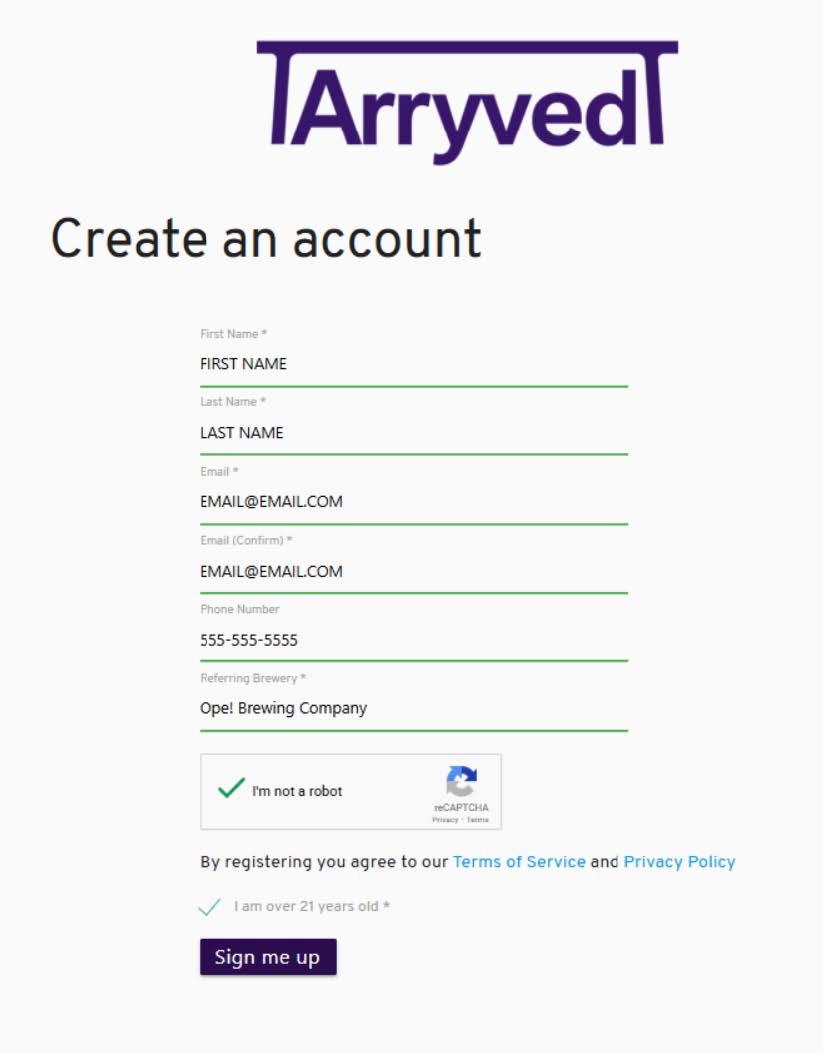
Fill out the form with all of your information and make sure to include your phone number as this will be the easiest/fastest way for us to look up your account. Once you click "Sign me up," Arryved will send you a one-time passcode to the email address entered upon sign up. Confirm your information to ensure your new Rewards account is active. YOUR MEMBERSHIP WILL NOT BE LIVE UNTIL YOU CONFIRM YOUR ARRYVED INSIDER ACCOUNT. However, your points will be "held" under your account and will be released upon confirmation.
This email and phone number will be used for your Ope! Rewards membership.
STEP 2
VISIT OPE! REWARDS TO LOG IN
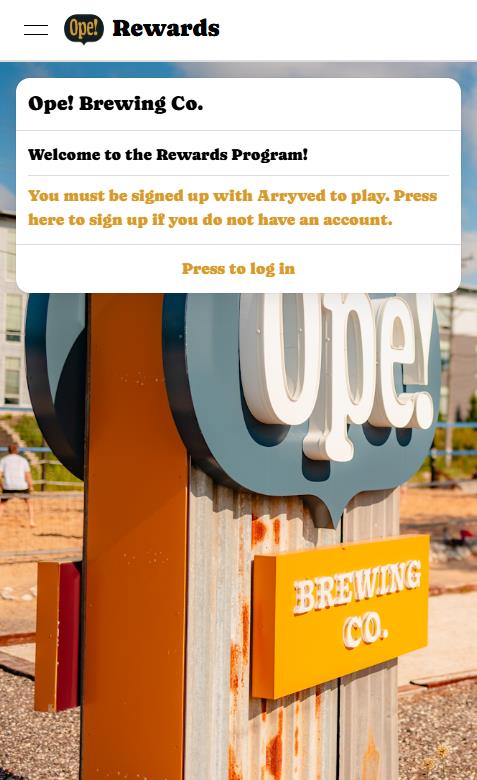
Once you have completed and confirmed your Arryved Insider account, head to https://opebrewingco.creamcityinnovations.com/ to log in. You will be brought to a Cream City Innovations site (a partner of Ope! Brewing) which will prompt you to "Press go log in" where you will then be asked to sign in with your email. MAKE SURE TO USE THE SAME EMAIL YOU USED TO SIGN UP FOR THE ARRYVED INSIDER PROGRAM. Again, these are one and the same.
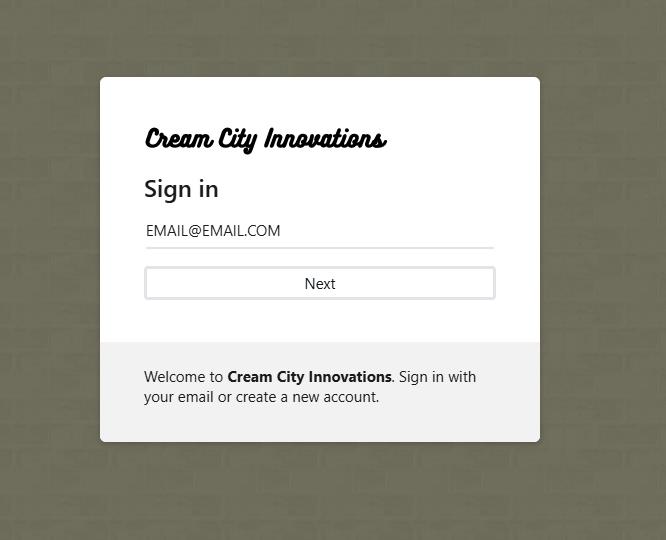
Once you hit "Next," you will receive a code to the email address provided which you will then use to verify your account. No password is necessary as this system uses two factor authentication via the code sent to your email address.
STEP 3
EXPLORE YOUR NEW OPE! REWARDS ACCOUNT
If you have an account, you will see a button on the top left which will expand the menu. This will be how you access the various pages of the Ope! Rewards website.
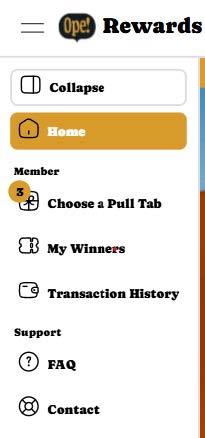
Click on the "Choose a Pull Tab" link to view the various pull tabs available for redemption. This will bring you to the page where you can redeem your points for pull tabs.
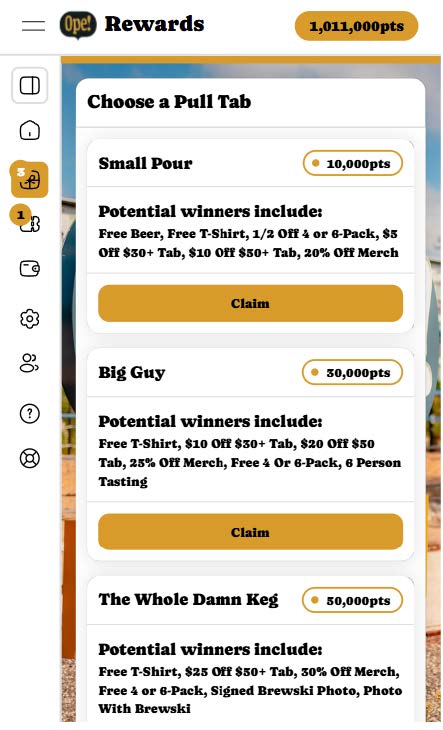
There are three tiers of pull tabs with increasing point values: Small Pour (10k points), Big Guy (30k points) and The Whole Damn Keg (50k points). If you have enough points in your balance, you will be able to redeem the according pull tab tier. If you do not have enough points, the corresponding tier will be greyed out.
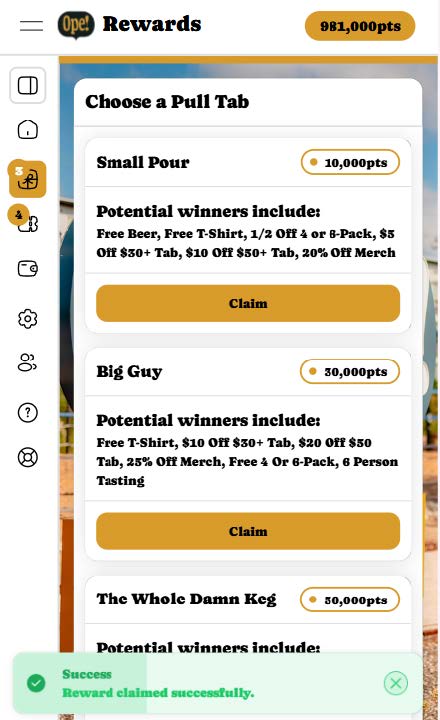
Once you click "Claim," you will see a notification on the bottom of your screen informing you that you have successfully claimed a pull tab. The corresponding pull tab tiers points will be deducted from your balance and your account should reflect your new point total. Your next step will be to navigate to the "My Winners" page where you will see your new claimed pull tab.
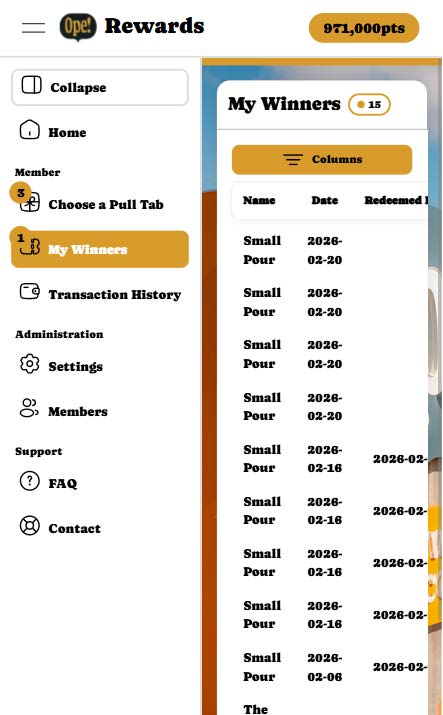
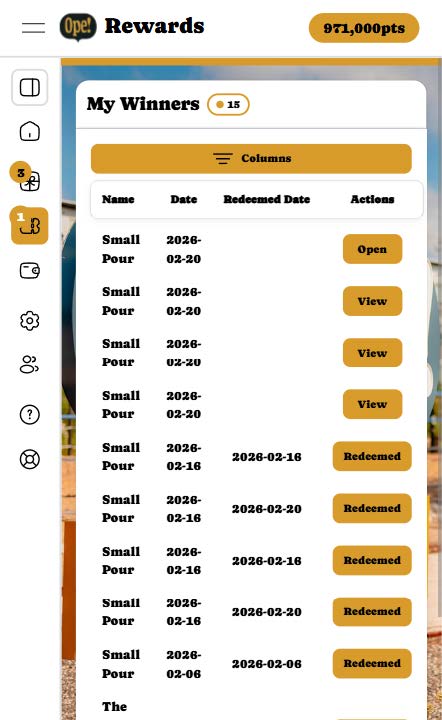
On the My Winners page, you will see all of the pull tabs that you have claimed.
- Newly claimed pull tabs will say “Open”
- Opened pull tabs that have yet to be redeemed will say “View”
- Redeemed pull tabs will say “Redeemed”
To open a newly claimed pull tab, click on "Open" on the corresponding pull tab within the "My Winners" page. Below is a gif showcasing how to open a pull tab.
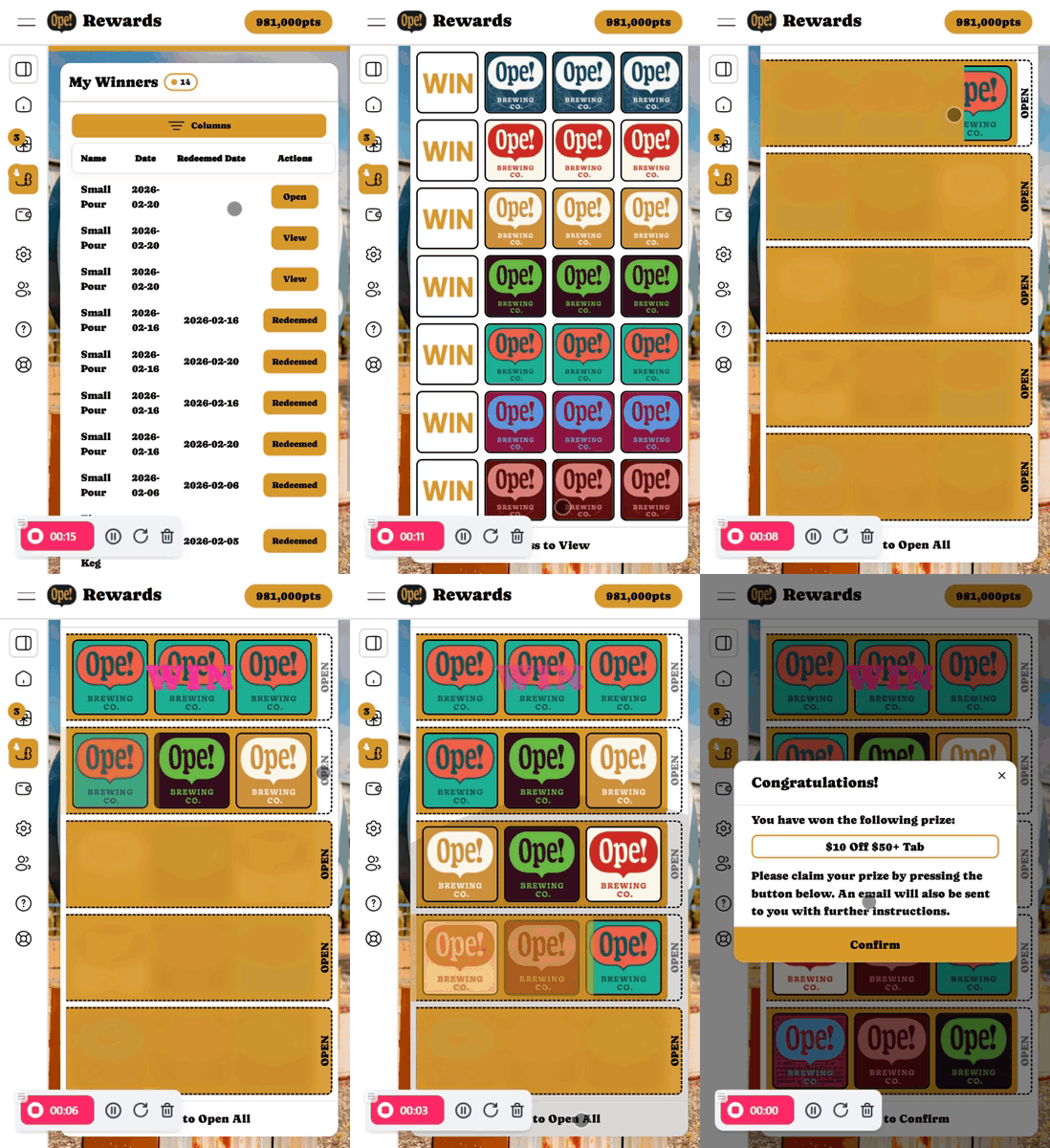
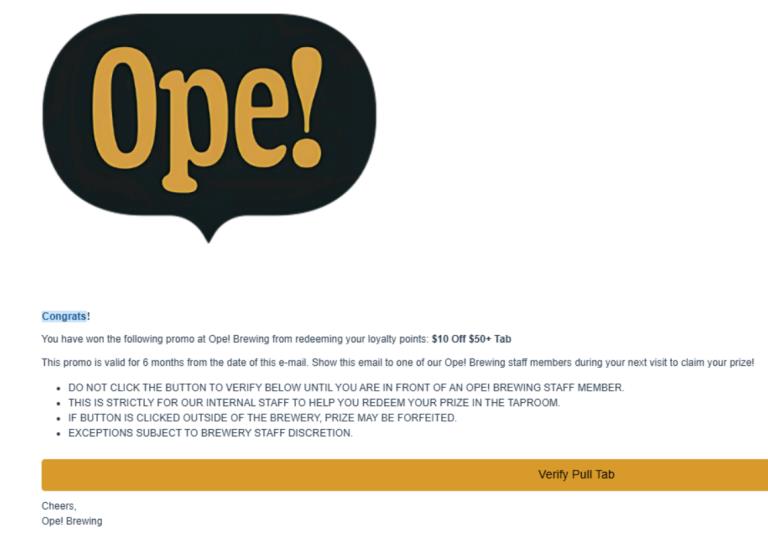
Once you've opened the pull tab, you will be presented with a message stating your prize. From here, click "Confirm" on the pop-up which will also send you an email with verification of your claim and prize win. The email will be sent by our partners at [email protected].
Frequently Asked Questions
Ope! Got a question? We got an answer! Also feel free to chat with us on the bottom right!
What kind of beers do you offer?
We strive to provide delicious beer options for everyone and their Mom. We have a wide variety. We have a couple two three hard seltzers as well.
Can you fill my growler?
We avoid growlers to provide optimal product quality whether you enjoy your purchase today or in a few weeks. We fill can crowlers. Keep our beer cold.
Is your taproom dog friendly?
Yes, we are dog friendly indoors and out. Dogs must be kept on a leash. Mischievous pups or those prone to messes are best left at home, yah? Check out our official Pet Policy for more info.
Do you have N.A. (Non-Alcoholic) Beverages?
We have soda pop (Two Brothers products), Hop Water, NA Beer and CBD Beverages. West Allis also has some of the best tap water in the world, try it!
Will you show “The Big Game” on your TV’s?
We will tune in for Packers, Brewers, Bucks, Marquette, Badgers and major sports events (e.g, PGA Tour Majors, Superbowl, World Series, World Cup, etc.). Otherwise, our TV’s will only be on by request.
Can I bring outside food?
For a small fee outside food is allowed. Reservations with BYO food needs to be approved prior. Otherwise please support our food truck partners!

Hours
MON-THURS: 4pm - 11pm
FRI-SAT: 11am - 11pm
SUN: 11am - 8pm
OPE! Brewing Co.
is committed to making our website accessible to everyone, including individuals with disabilities. We strive to follow best practices and standards as defined by the Web Content Accessibility Guidelines (WCAG) 2.1 AA.
If you experience any difficulty accessing content or navigating any part of this site, please contact us at
[email protected]. Your feedback will help us make improvements and ensure an inclusive experience for all visitors.